
My Hurricane Tracker Pro
JRustonApps B.V.Weather
4.8177.00 Reviews
- Version
- 26.4.1
- Installs
- 10.00K
- Age Rating
- Everyone
Screenshots
Our Review of My Hurricane Tracker Pro
 Analysis by Appyee
I would treat My Hurricane Tracker Pro as a focused storm-monitoring tool, not as a replacement for every kind of weather app. That distinction matters from the first screen: its purpose is to help me follow tropical systems and their movement, rather than give equal attention to an hourly forecast, rain radar, or a week of local conditions. If a storm is relevant to my home, travel plans, or family, that narrower focus can make the information easier to follow. If I only want to know whether to carry an umbrella, a general forecast app is usually the quicker choice.
The app is made by JRustonApps B.V. and sits in the weather category, with a 4.7 average from around 1.1K ratings and over 10K installs. It is a paid app at $3.99, with in-app purchases listed at $0.99 per item, so I would check the purchase details before committing rather than assume every option is included. Its Everyone age rating makes it suitable for a broad audience, while the practical value is strongest for people who have a reason to monitor tropical weather. The current version is 26.2.2, and it requires Android 7.0 or later.
Where storm tracking can feel unfamiliar
The first hurdle is not necessarily finding the map; it is knowing what to do with a projected path. A line or cone can look precise even though a storm’s future movement is uncertain. I use the display to understand the broad area that may be affected, not to decide that one particular street is safe or that a storm will arrive at an exact hour. That is a useful habit for anyone new to tracking: treat the map as a changing forecast, not a promise.
Another possible sticking point is the app’s specialised focus. Someone opening it during ordinary, calm weather may not immediately see the value of a dedicated hurricane tracker. Its benefit becomes clearer when I have a specific system or location in mind. Before browsing, I would decide whether I am checking a storm near home, watching a destination, or comparing a developing system with past storms. A clear question makes the available detail easier to interpret.
Checks that make a first session more useful
I would start by selecting the place I actually care about, then confirm that the map is showing the intended region before drawing conclusions from a storm’s position. This small check matters if I am following several places, such as home and a holiday destination: a storm can be far from one location and much more relevant to another. I would also review alert choices deliberately. Notifications are helpful only when they reflect what I need to know, and too many broad alerts can become background noise.
For a travel day, my routine would be to check the destination and the route separately, then revisit the information before leaving rather than relying on a screenshot from the day before. Storm tracks can change, so an old image is a poor substitute for a fresh check. If I am monitoring for a family member, I would agree on which location matters and what kind of update should prompt a conversation. That avoids treating every notification as an emergency while still keeping everyone attentive.
Recovering when a view or alert is confusing
If a map appears to show nothing useful, I would first check the selected area and whether there is an active storm relevant to it. A quiet map does not automatically mean the app has failed; it may simply be showing a region without a system to follow. If the information seems stale or a screen does not load as expected, I would try a basic recovery sequence: return to the main view, reopen the relevant storm or location, and check the connection before making a decision from incomplete information.
For alerts that do not match my expectations, I would revisit the location and notification settings rather than immediately assuming the forecast itself is wrong. A notification setup can be too narrow to catch the event I care about or too broad to be useful. The practical fix is to make one adjustment at a time and observe what changes. For important decisions, I would also compare the app’s storm picture with current local emergency guidance; a tracker helps me follow a system, but it is not a substitute for instructions from authorities.
What the tracker can and cannot settle
Weather apps can differ because they present forecasts for different purposes and may update at different moments. A general-purpose forecast is better for routine questions such as rain later today, while this app is aimed at following tropical storms and cyclones. If two screens appear to disagree, I would check that they refer to the same storm, location, and forecast time before comparing them. A difference in presentation is not, by itself, proof that either view is broken.
Likewise, a forecast path cannot tell me exactly what conditions I will experience at my address. I use it as context for planning and keep a separate eye on local warnings and official instructions. That is especially important when deciding whether to travel, shelter, or change plans. The tracker can help me understand why a situation deserves attention; it should not be the only source I consult for safety-critical choices.
A Deep Dive into Features
Right off the bat, My Hurricane Tracker Pro impresses with its clean and intuitive interface. One of the first things you’ll notice is the minimalist design that makes navigation a breeze. You won’t find yourself overwhelmed with information, which is a common pitfall with weather apps.
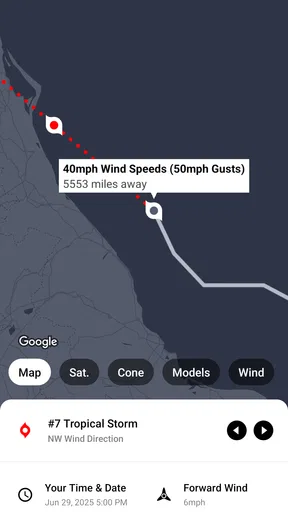
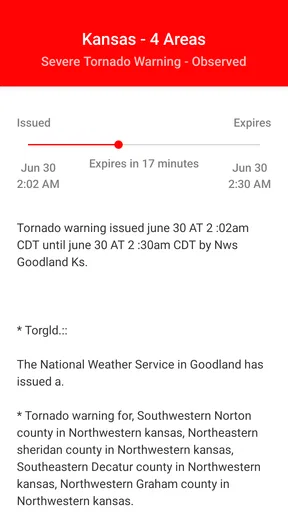
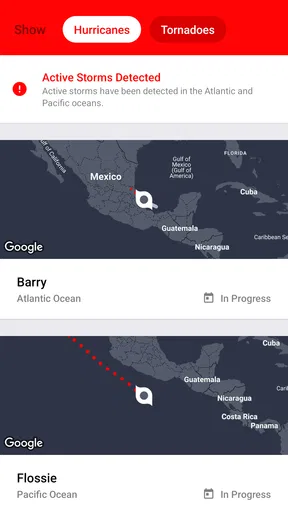
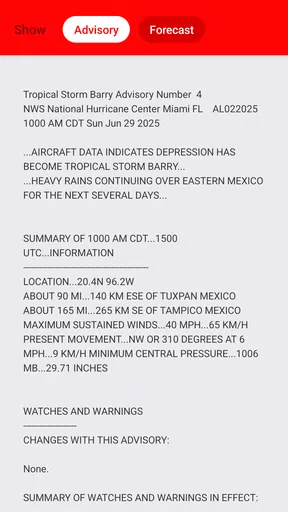
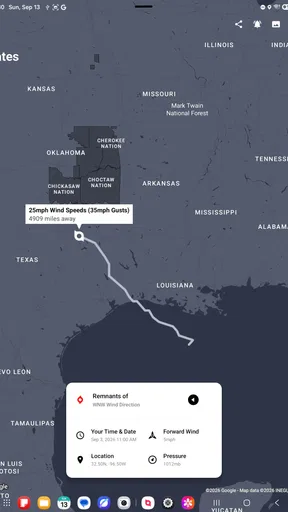
The app’s primary feature is, of course, storm tracking. It provides real-time updates and alerts for hurricanes, tropical storms, and even cyclones. You can view the current position and projected path of any storm across the globe. It’s like having a front-row seat to Mother Nature’s most dramatic performances!
Detailed Storm Information
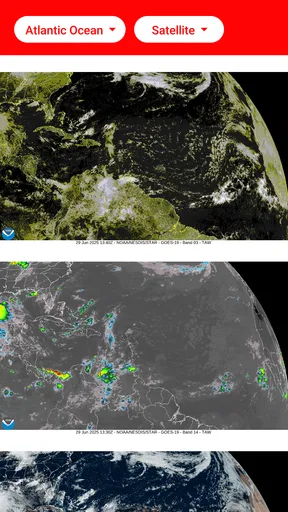
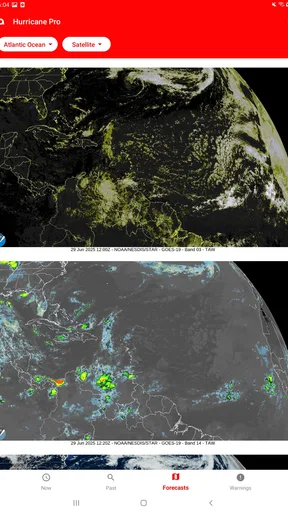
If you’re a weather geek like me, you’ll appreciate the depth of information available. Each storm entry includes details like wind speed, pressure, and the storm’s current category. The app also offers satellite imagery, which is not only informative but pretty darn cool to look at.
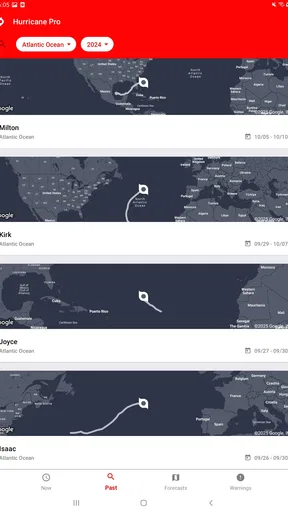
One feature I found particularly useful is the app’s historical data. You can look up past storms, which is great for anyone interested in patterns or comparisons. It’s like having a mini weather archive in your pocket.
That past-storm view is useful when I want context, but I would use it for learning rather than prediction. Comparing a current system with an older one can help me notice differences in track or intensity, yet it cannot establish that the new storm will behave the same way. A practical workflow is to check the current storm first, then consult history only if I have a specific comparison in mind. That keeps an interesting archive from distracting me from the latest information.
Customizable Alerts
Nobody wants to be caught off guard by a storm, and My Hurricane Tracker Pro ensures you won’t be. The app allows you to set up custom alerts for specific locations. Whether you’re tracking storms for home, work, or a vacation spot, you’ll get timely notifications to keep you informed.
These alerts are highly customizable, which means you can fine-tune them to suit your needs. Want alerts for only Category 3 storms and above? You got it. Prefer notifications at certain times of the day? Done.
My advice is to set alerts around places that genuinely affect a decision, not every location I might casually be curious about. A home alert can support preparedness, while a destination alert may help me reconsider a trip; an alert for a place with no bearing on my plans can add noise. I would also leave room for checking manually when circumstances change, because notifications are a prompt to look again, not a guarantee that I have seen every relevant update.
User Experience
Now, let’s talk about user experience. The app runs smoothly, and I didn’t encounter any crashes or bugs during my time with it. The developers clearly put a lot of thought into making sure everything works seamlessly. The loading times are quick, and the transitions between different sections of the app are fluid.
Another thing I love is that the app is ad-free. In a world where every app seems to bombard you with ads, this is a refreshing change. It’s just you and the weather data, no distractions.
Even with a clean interface, the amount of storm information can take a little getting used to if I have never tracked a tropical system before. I would begin with the storm’s location and projected path, then look at details such as wind speed and pressure when I want more context. That order keeps the screen from becoming a collection of numbers without a clear purpose. It also makes the app easier to share with a less weather-minded relative: point out what is changing and why it matters, rather than expecting them to interpret every field at once.
Accessibility and Compatibility
The app is available for both Android and iOS, and it runs well on a variety of devices. Whether you’re using the latest smartphone or an older model, you’re in good hands. The developers have ensured that the app remains accessible to a broad audience.
Additionally, the app supports multiple languages, making it useful for users around the world who might be tracking storms in different regions.
On Android, the minimum operating-system requirement is 7.0, which gives owners of compatible older devices a clear starting point for deciding whether to install it. I would still make sure the store page for my own device shows the current app as compatible before purchasing. Since the app is paid and offers optional in-app purchases, I would review the purchase prompts carefully and decide whether the core storm-tracking use I want justifies the cost. It is a more sensible buy for someone who expects to follow storms than for someone who opens a weather app only a few times a year.
Who will get the most from it
I think the strongest fit is someone who lives in, works in, or regularly travels through areas affected by tropical systems and wants a dedicated way to follow their development. It also suits curious weather readers who enjoy checking storm structure and looking back at earlier events. A realistic everyday use might be a person with a coastal family member: they can keep the relative’s area in view, check the storm’s movement during the day, and use a notification as a cue to call and compare plans.
By contrast, I would skip it if I mainly need hourly temperatures, a rain-on-the-way warning for a short walk, or a broad forecast for changing daily conditions. A standard weather app is usually a better fit for that routine. I would also avoid treating this as a complete emergency-preparedness service. Its focused tracking can inform a decision, but local authorities and emergency services remain the right source for instructions on what to do.
How it compares with general weather apps
The main trade-off is specialisation. General weather apps typically put everyday forecasts and local conditions at the centre, which is convenient when storms are not the concern. This tracker puts storm monitoring first, making it a more purposeful companion when a tropical system is developing. I would keep both kinds of tools only if I have a genuine need for both; otherwise, paying for a focused app may feel unnecessary between storm seasons.
That focus also means I would not judge it by whether it replaces my usual forecast app in every situation. I would judge it by whether it helps me answer storm-specific questions with less friction: where a system is, how its projected path is changing, and what details deserve closer attention. If those are questions I ask often, the dedicated approach is valuable. If not, the simpler choice is to stick with an everyday forecast service and consult trusted local alerts when severe weather threatens.
Final Thoughts
In conclusion, My Hurricane Tracker Pro is a powerhouse app for anyone interested in weather phenomena. It’s packed with features, yet remains user-friendly and accessible. The alerts are customizable, the information is detailed, and the design is sleek.
Whether you’re a weather enthusiast, a frequent traveler, or just someone who likes to stay informed, this app is worth checking out. It’s a reliable companion for navigating through hurricane season and beyond. So, if you’re on the hunt for a comprehensive hurricane tracking app that won’t let you down, give My Hurricane Tracker Pro a try. You’ll be glad you did!
Verdict
Strengths of My Hurricane Tracker Pro
- Comprehensive storm tracking features.
- Real-time alerts for severe weather.
- Detailed forecasts and radar maps.
- User-friendly interface for easy navigation.
- Customizable notifications and settings.
Limitations of My Hurricane Tracker Pro
- Requires internet for full functionality.
- Subscription needed for some features.
- Occasional lag in notifications.
- Limited offline data storage.
- Interface can be overwhelming for new users.
Other Releases by JRustonApps B.V.
View All
My Moon Phase - Lunar Calendar
Weather4.8

My Tide Times - Tables & Chart
Weather4.8

My Hurricane Tracker & Alerts
Weather4.7

My Lightning Tracker Pro
Weather4.7
Similar Picks in This Category
View All
Weather - By Xiaomi
Xiaomi Inc.4.1

Weather & Radar Forecast
WetterOnline4.8

Weather
OneLouder Apps4.6

AccuWeather: Weather Radar
AccuWeather3.6

The Weather Channel - Radar
The Weather Channel4.6

1Weather Forecasts & Radar
OneLouder Apps4.3
Frequently Asked Questions
What features does My Hurricane Tracker Pro offer?
My Hurricane Tracker Pro provides real-time updates on hurricanes, tropical storms, and weather disturbances. It includes interactive tracking maps, NOAA forecasts, and notifications for new weather alerts. Users can also access historical storm data and customize their notifications to receive updates about specific regions or storm categories.
Is My Hurricane Tracker Pro user-friendly?
Yes, My Hurricane Tracker Pro is designed with an intuitive interface that is easy to navigate, even for users with minimal technical skills. The app features simple menus and detailed maps, making it straightforward to track storms and access important information quickly. Its design caters to both novice and experienced users.
How accurate is the weather data provided by My Hurricane Tracker Pro?
My Hurricane Tracker Pro sources its data from trusted meteorological agencies like NOAA and the National Weather Service. This ensures that users receive accurate and timely updates on storm paths and potential impacts. However, weather predictions can change, so it’s always good to stay informed and use multiple sources when necessary.
Does My Hurricane Tracker Pro require a constant internet connection?
To access the most current updates and maps, My Hurricane Tracker Pro requires an internet connection. This allows the app to download real-time data and send notifications about weather changes. However, previously downloaded information can be accessed offline, which is useful in areas with intermittent connectivity.
Is there a cost to download or use My Hurricane Tracker Pro?
My Hurricane Tracker Pro is a paid app, offering advanced features and an ad-free experience. While there is a cost to download, users find value in the comprehensive tracking capabilities and reliable alerts it provides. It's a worthwhile investment for those living in hurricane-prone areas or those who need detailed storm tracking.
